Year
2024 - Ongoing
Scope Of Work
User Journey Mapping
Information Architecture
User Research

At SocialPilot, we worked on improving one of our most used features, Social Inbox. As more users started managing multiple clients and social accounts, the old version became hard to use and didn’t support their growing needs.
We redesigned it to make things easier and more organized. Now, users can create multiple inboxes to group accounts by client, quickly see the difference between comments, messages, and mentions, and use tags to keep things sorted. We also added tabs like Unread, Starred, Done, and All to help users manage their messages better.
The new design is cleaner, faster, and much easier to use. It helps teams reply quicker, stay on top of their work, and handle more accounts without feeling overwhelmed.

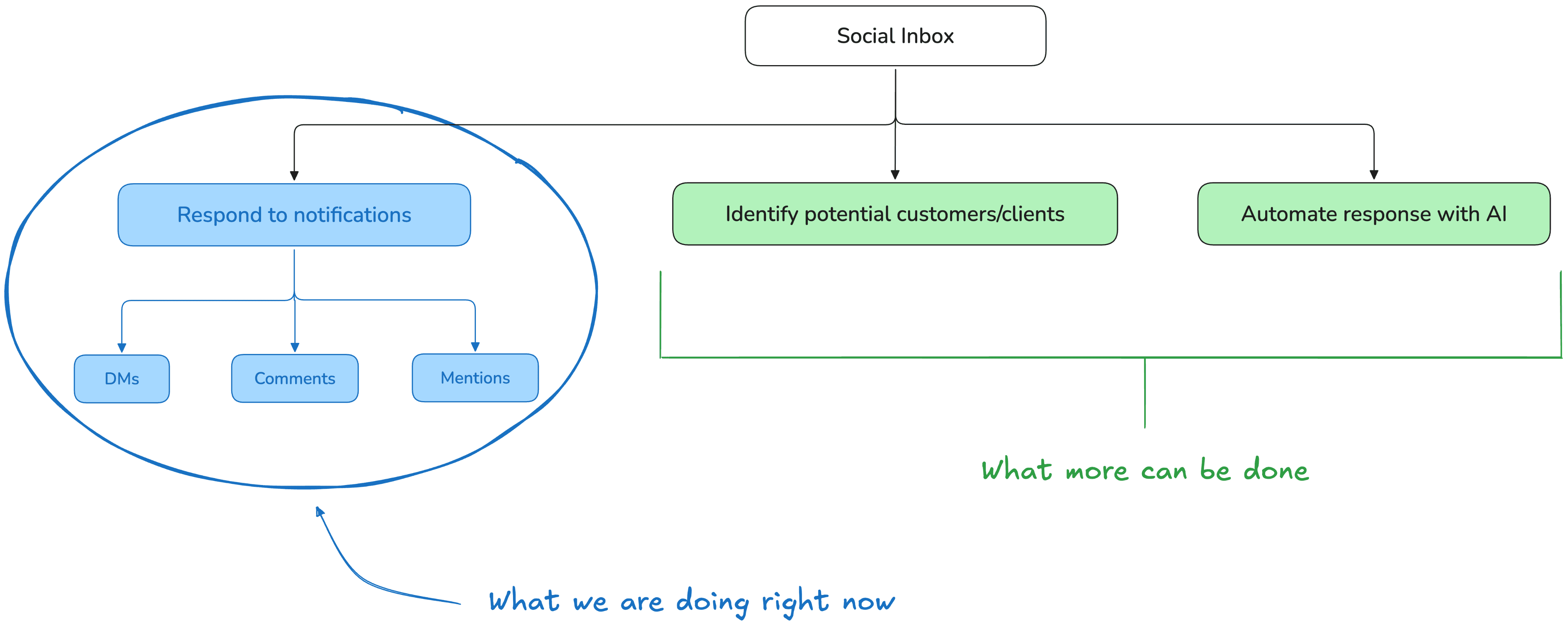
While SocialPilot had established a significant user base of Social Marketers/Agencies, they faced several key challenges as they continued to scale:
❌ Message Overload
Users (especially agencies and managers handling multiple brands) were overwhelmed by a single stream of mixed conversations. It was like finding a needle in a bag of hay.
❌ Poor Message Type Clarity
No easy way to tell whether a message was a comment, DM, or mention clearly which caused confusion and slow responses. Leading to frustrations and confusions
❌ Lack of Segregation
Without tagging or sorting, keeping track of specific platforms, clients, or message statuses was tough especially when you are handling multiple clients/accounts
❌ No Clear Workflow
Users had no built-in way to track progress (like unread/starred/done), leading to duplicated work or missed messages. There must be some way to mark this done and keep them aside.

Having the challenges/pain points all figured out, we thought the journey would be easy but we were wrong. Here are some challenges we faced during the redesign.
🛑 Balancing Power and Simplicity
We wanted to give users more control with features like multi-inbox and tagging, but without making the interface feel complicated. The goal was to keep things powerful yet simple, so users don’t get confused or slowed down.
🛑 Maintaining High Performance
With more inboxes and messages to handle, the interface had to manage a lot more data. We worked on improving performance so everything loads quickly and runs smoothly for the user.
🛑 User Habit Disruption
Since users were used to the old layout, changing too much could confuse them. We redesigned the inbox to feel fresh but still familiar, so it’s easy to learn without starting from scratch.
🛑 Edge Cases for Large Teams
Teams handling 10 or more clients needed a way to switch and sort through accounts quickly. We focused on keeping navigation simple and efficient, even when the workload gets big.
After brainstorming with stakeholders and gathering feedback from customer specialists, we finalised solutions for each challenge, giving us a clear direction to move forward.
✅ Introduced Multiple Inboxes
Despite their success, their website no longer fully reflected the advanced capabilities of their platform, nor the growth trajectory they were on.
✅ Clear Visual Cues for Message Types
Added distinct icons or markers for comments, DMs, and mentions—so users know exactly what they’re dealing with.
✅ Smart Segmentation with Tags
Custom tags let users organize conversations by topics, urgency, or campaign.
✅ Inbox Status Tabs
'Unread', 'Starred', 'Done', and 'All' tabs help streamline message triage and resolution.
✅ Polished UI with Intentional Hierarchy
The visual refresh improves clarity, reducing mental load while navigating multiple conversations.


Since the feature and its components were used extensively, we wanted to keep the design scalable and easy to update. To achieve this, we followed these design practices.
✅ Centralised Design System
We stuck to a centralised library of components, styles, and guidelines. It kept everything consistent and makes updating easier across the board.
✅ Flexible Layouts
We designed with responsiveness and adaptability in mind so the UI works on different screen sizes or new features without a total overhaul.
✅ Clear Documentation
We kept detailed notes on how components work, their states, and usage rules which helped new team members to jump in and ensures consistency.